
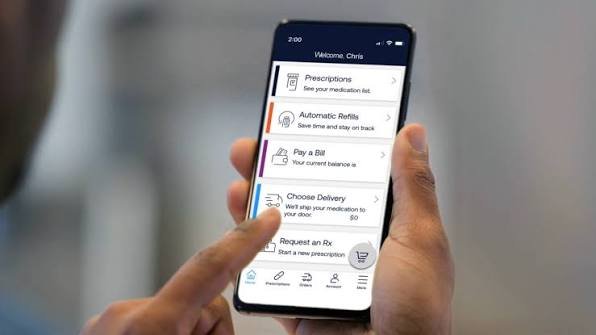
Managing prescription medications can sometimes feel complicated, especially when you need to check coverage, request refills, or follow a medication delivery. Express Scripts provides an online platform that helps eligible members handle many of these tasks from one place.
The Express Scripts Login page allows registered members to access their prescription information, review available pharmacy benefits, manage eligible prescriptions, and track orders. Instead of relying entirely on phone calls or visiting a pharmacy, users can handle several routine activities online.
Whether you are accessing your account for the first time or experiencing difficulties signing in, understanding how the platform works can make the process easier. This guide explains how to log in, create an account, recover forgotten credentials, use the mobile application, and contact customer support.
What Is Express Scripts?
Express Scripts is a pharmacy benefit management organization in the United States. It works with health plans, employers, government programs, pharmacies, and other healthcare organizations to help manage prescription drug benefits.
The company is part of Evernorth, the health services business of The Cigna Group. Its services are designed to connect eligible members with prescription coverage information, pharmacy networks, medication delivery, and other pharmacy-related resources.
One of its main purposes is to make prescription management more convenient. Members can use its digital services to check medication costs, review available coverage, request eligible refills, and monitor prescription orders.
However, not every service is available to every member. Access depends on the prescription plan, insurance arrangement, and individual eligibility.
What Is Express Scripts Login?
Express Scripts Login is the official online sign-in facility for registered members who want to access their pharmacy benefit information.
The login system connects users with their personal accounts. Once signed in, eligible members can view prescription-related details and use the services included in their plans.
The platform is particularly useful for people who regularly take prescription medication. It provides a central location for checking available benefits and keeping track of medication-related activities.
Users generally need a registered username and password. Express Scripts also requires two-step verification, which adds another layer of security when accessing an account.
Official website: https://www.express-scripts.com/login
How to Access the Login Page
Finding the correct login page is the first step toward accessing your account. Users should always visit the official Express Scripts website rather than entering personal information on unfamiliar websites.
Follow these steps:
- Open a trusted web browser on your computer, tablet, or smartphone.
- Visit www.express-scripts.com.
- Select the Login option on the website.
- Alternatively, open the direct login page at https://www.express-scripts.com/login.
- Check that the website address belongs to the official Express Scripts domain.
- Enter your registered username and password.
- Complete the required security verification.
- Select the login button to access your account.
After successful authentication, you should be directed to your member account.
The website may display different information depending on your prescription benefits and account settings.
How to Log In to Your Account
The Express Scripts sign-in process is straightforward for members who have already registered.
First, visit the official login page. You will find fields for your username and password. Enter the credentials associated with your account and select the login button.
You may then receive a one-time verification code through your registered email address. Enter that code when requested to complete the sign-in process.
Two-step verification is required to help protect accounts containing personal and health-related information.
If you use a trusted personal device, the website also provides a remember-login option. This can help reduce repeated verification requests under supported circumstances.
Avoid using this feature on shared computers or public devices.
How to Register for a New Account
People who have never used the Express Scripts website must create an account before accessing member services.
Registration connects your personal information with your eligible prescription benefits.
Here is how the process generally works:
- Visit the official Express Scripts website.
- Select the Register option.
- Provide the requested personal information.
- Have your prescription benefit identification information available.
- Follow the instructions to verify your identity and eligibility.
- Create a username and a strong password.
- Provide a valid email address and complete the required security steps.
- Follow the remaining instructions to finish registration.
Depending on the plan and registration process, you may be asked for a prescription ID, member ID, or other identifying information.
Once registration is complete, you can use your credentials to access the online account and supported mobile application.
Important: Registration requirements can vary between plans. If the standard registration process does not recognize your information, contact the customer service number associated with your prescription benefit.
How to Reset a Forgotten Password
Forgetting a password is a common reason people cannot access their online accounts. Fortunately, Express Scripts provides an account recovery option.
If you cannot remember your password, follow these steps:
- Open the official Express Scripts login page.
- Select the Reset Password option.
- Enter your first and last name.
- Provide your date of birth as requested.
- Submit the information.
- Follow the identity verification instructions.
- Complete the password recovery process.
You may receive additional instructions to verify your identity before creating a replacement password.
Choose a password that is difficult to guess and avoid reusing credentials from other websites.
Official password recovery page: https://www.express-scripts.com/recover/password
How to Recover a Forgotten Username
Sometimes the problem is not the password but the username itself.
Express Scripts provides a separate username recovery facility. Users can visit the official login page and select the Forgot Username option.
The recovery page asks for basic identifying information, including:
- First name.
- Last name.
- Date of birth.
After submitting the requested details, follow the instructions displayed on the website.
Make sure the information matches the details associated with your registered account. Incorrect personal information may prevent the system from locating your membership.
If the recovery process does not work, contact Express Scripts technical support for further assistance.
Official recovery page: https://www.express-scripts.com/recover/username
Express Scripts Mobile App
Express Scripts also offers a mobile application for people who prefer managing their prescription benefits through a smartphone.
The app provides convenient access to supported account services without requiring users to open a desktop browser every time they need information.
Members can download the application through the official Apple App Store or Google Play Store.
Some available features include:
- Viewing prescription information.
- Requesting eligible refills.
- Checking medication order status.
- Tracking home-delivery prescriptions.
- Finding participating pharmacies.
- Accessing supported digital prescription information.
- Receiving account and medication notifications.
The application can also help users stay organized with medication-related reminders.
One useful feature is the ability to manage prescriptions while away from home. This can be particularly convenient when checking an order or looking for a participating pharmacy.
Use the same registered account credentials when signing in, subject to the app’s verification requirements.
Features Available After Login
The Express Scripts member portal offers several tools designed to simplify prescription benefit management.
Prescription Management
Members can review eligible prescriptions and access available refill or renewal services. This can make it easier to manage recurring medication needs.
Medication Pricing and Coverage
The platform allows eligible members to check prescription coverage and compare available medication costs.
Pricing information can help users understand potential out-of-pocket expenses before filling a prescription.
Order Tracking
For prescriptions processed through supported home-delivery services, members can check order progress and available shipment information.
This makes it easier to understand whether a medication order is being processed or has been shipped.
Pharmacy Locator
Members can search for participating pharmacies within their plan’s network.
This feature is useful when travelling or when looking for a convenient pharmacy near home or work.
Prescription History
Depending on account access and plan features, users can review available prescription information and previous medication-related transactions.
Notifications and Alerts
Members may be able to receive notifications about prescription orders, refills, benefits, and other account activities.
These alerts can help users stay informed about important updates.
Understanding Two-Step Verification
Account security is especially important when a website contains personal and prescription-related information.
Express Scripts uses two-step verification to provide additional protection against unauthorized account access.
The process generally involves two stages.
First, the member enters their username and password. Next, the system sends a single-use verification code to the registered email address.
After entering the correct code, the user can complete the login process.
Members may also add text messaging as an available verification method after completing the initial setup.
This additional security step helps protect sensitive information even if someone obtains a user’s password.
Common Express Scripts Login Problems
Although the login system is designed to be straightforward, users may occasionally experience technical difficulties.
Understanding common problems can help identify the appropriate solution.
Incorrect Username or Password
One of the most common problems is entering incorrect login information.
Check your spelling, capitalization, and keyboard settings. If you cannot remember your credentials, use the official recovery options.
Verification Code Not Received
If the verification email does not arrive, check your spam or junk folder.
Make sure the email address registered with your account is correct. If you still cannot receive the code, contact technical support.
Website Not Loading
Sometimes the login page may not load correctly because of browser problems or temporary technical issues.
Try refreshing the page, updating your browser, or opening the website in another supported browser.
Clearing your browser cache may also help.
Account Access Problems
If your account information cannot be verified, check whether the personal details you entered match your registration information.
If the issue continues, contact Express Scripts directly rather than repeatedly submitting incorrect information.
Mobile App Issues
If the application stops responding, check whether an update is available through your device’s official app store.
You can also restart your phone and try signing in again.
How to Keep Your Account Secure
Because prescription accounts contain personal information, members should take reasonable precautions when accessing their profiles.
Use a strong and unique password rather than a simple combination that others could guess.
Never share your password or verification code with strangers. Express Scripts login credentials should remain private.
Always access the website through its official domain. Avoid following suspicious links received through unsolicited emails or text messages.
It is also important to sign out after using a shared computer. Avoid saving passwords on public devices.
Finally, keep your registered email address and mobile number updated so that you can receive important security notifications and verification codes.
How to Contact Express Scripts Customer Support
If you cannot access your account after trying the available recovery options, contacting customer support is the next practical step.
Express Scripts provides different contact channels for prescription questions, account assistance, and plan-specific concerns.
Some important contact numbers include:
- General patient customer service: 800-282-2881.
- Online account technical support: 800-711-5672.
- Medicare member support: 866-529-4917.
- TRICARE beneficiary support: 877-363-1303.
These numbers serve different purposes, so members should select the appropriate department.
For general prescription questions, calling the number on the back of your member ID card is also recommended.
The official contact page provides additional information:
Members who can access their accounts can also visit the Help section and select FAQs & Contact Us for additional assistance.
Benefits and Limitations of Express Scripts
Like other online pharmacy benefit platforms, Express Scripts has advantages as well as limitations.
Benefits include:
- Convenient online access to prescription information.
- Digital tools for eligible prescription refills.
- Medication pricing and coverage information.
- Home-delivery order tracking.
- Access to participating pharmacy locations.
- Mobile account management.
- Additional login security through verification.
Limitations include:
- Some features depend on individual insurance plans.
- Registration requires identity and eligibility verification.
- Certain prescriptions may need additional authorization.
- Technical problems can occasionally interrupt access.
- Not every medication is eligible for home delivery or online refills.
Understanding these limitations helps users develop realistic expectations when using the platform.
Interesting Facts About Express Scripts
There are several useful things worth knowing about the organization beyond its login service.
1. Part of The Cigna Group: Express Scripts operates within Evernorth, the health services business of The Cigna Group.
2. Digital account management: Members can use online tools and a mobile application to access supported pharmacy services.
3. Home-delivery options: Eligible members may be able to receive certain prescriptions through home delivery.
4. Medication savings tools: The platform provides prescription pricing information and personalized savings recommendations where available.
5. Pharmacy network access: Members can search for participating pharmacies based on their prescription benefits.
6. Specialty medication services: Express Scripts is associated with Accredo, a specialty pharmacy serving people who need certain complex medications.
7. Around-the-clock support: Express Scripts Pharmacy provides patient support 24 hours a day, seven days a week through its published customer service channels.
These features demonstrate that the organization provides more than a simple prescription login facility.
Final Thoughts
The Express Scripts Login platform provides eligible members with a convenient way to manage prescription benefits and access pharmacy-related information online.
From checking medication coverage to requesting eligible refills and tracking home-delivery orders, the website and mobile application offer several useful digital services.
Getting started requires a registered account, valid login credentials, and completion of the required security verification.
If you experience difficulties, the official username recovery, password reset, and customer support services can help you regain access.
For the safest experience, always use the official Express Scripts website and follow the security instructions provided during login.
FAQs
How do I access Express Scripts Login?
Visit https://www.express-scripts.com/login, enter your registered username and password, and complete the required two-step verification to access your account.
2. Can I use Express Scripts without registering?
No. You generally need to create an online account before accessing personalized prescription information and member services. Registration requires identity and benefit verification.
3. How can I reset my Express Scripts password?
Select Reset Password on the official login page. Enter your first name, last name, and date of birth, then follow the verification instructions.
4. Does Express Scripts have a mobile app?
Yes. Express Scripts offers mobile applications for supported iOS and Android devices. Members can use the app to access eligible prescription services, track orders, and manage their accounts.
5. What should I do if Express Scripts Login is not working?
Check your username and password, verify your internet connection, and make sure you can receive the security code. For technical assistance, call 800-711-5672.



Leave a Reply